Ship in parallel
Run several agents at once instead of babysitting one. Isolated worktrees and per-task ports mean no branch collisions and no stash gymnastics.
Worktrees · ports · servicesFeather Terminal is a free, local-first desktop app for Claude Code, Codex, Gemini CLI and more. Every task gets its own Git worktree, terminal, chat and app preview, so five agents can build five things at once and you review one clean result.
 Feather Terminal
I’ll split the independent API, test, and copy work, then validate the combined result.
Search across workspaces and tasks. One quick switch brings you back to the work that matters.
⌘K in the desktop appNo matching tasks. Try “checkout” or “feather”.
Hide a task when you’re done with it. Find it in Hidden whenever you need it. Your work stays yours.
Try hiding and restoring a task.
Your workspacePREVIEW
No hidden tasks. Everything is in view.
Your favorite agents. Right at home.
WHY IT EXISTS / A note from the maker
Every agent wanted its own window. Claude Code in one terminal, Codex in another, something else in a third — each one good at what it does, and each one starting from nothing.
So I’d switch, and the thread went with it. The branch I was on. What we’d already tried. The reason we’d ruled it out. I’d type the whole story again to a different agent just to get back to where I already was.
I didn’t want to build another agent. I wanted somewhere to keep the ones I already use — one terminal, one chat, one place the work lives — so I can reach for whichever harness suits the task and it starts out knowing where I am.
The harness changes. Your context stays.
Mario — maker of Feather Terminal
~/acme-webcontext lost~/acme-webcontext lost~/acme-webcontext lost~/acme-webcontext keptWHAT IT IS / How it works
You add a repository once. From then on, every task runs in its own isolated worktree with its own terminal, chat, ports and app preview, and comes back to you as one reviewable change.
Point Feather at a local Git repo. It detects the framework, test command and dev-server port, and keeps them in one config you can read.
Any language · any frameworkDescribe the job, pick an agent, go. Each task gets its own worktree, branch and port, so agents never step on each other or on you.
Six agent CLIs · one workflowRead one combined diff. Run your tests and a second-agent review, then merge or open a pull request. Follow-ups queue themselves while you move on.
Evidence next to every changeWHY / How it helps
Agents are fast but messy. Feather keeps the speed and removes the mess: isolation for every task, evidence for every change, and a queue that keeps moving while you think.
Run several agents at once instead of babysitting one. Isolated worktrees and per-task ports mean no branch collisions and no stash gymnastics.
Worktrees · ports · servicesEvery task keeps its chat, terminal, runtime and diff. Queue a follow-up and it sends itself when the agent is free, even while you work in another task.
Chat · terminal · queue · replayTests, a second-agent review and GitHub checks sit next to the diff. Merge is gated on the current tree, never on a stale report.
Tests · review · checkpoints · PRsYour repository never leaves your machine. Agents use your own CLI logins. Remote access from your phone is optional and end-to-end encrypted.
Local-first · encrypted remoteMade for
◆ Solo builders running several agents at once ◆ Teams that review agent output before it merges ◆ Anyone who wants agents without giving up local controlReal screens Captured from the running app
Seven screens, straight out of the developer preview on macOS. The same glass, the same density, the same live state you get the moment you open it.
Feather Terminal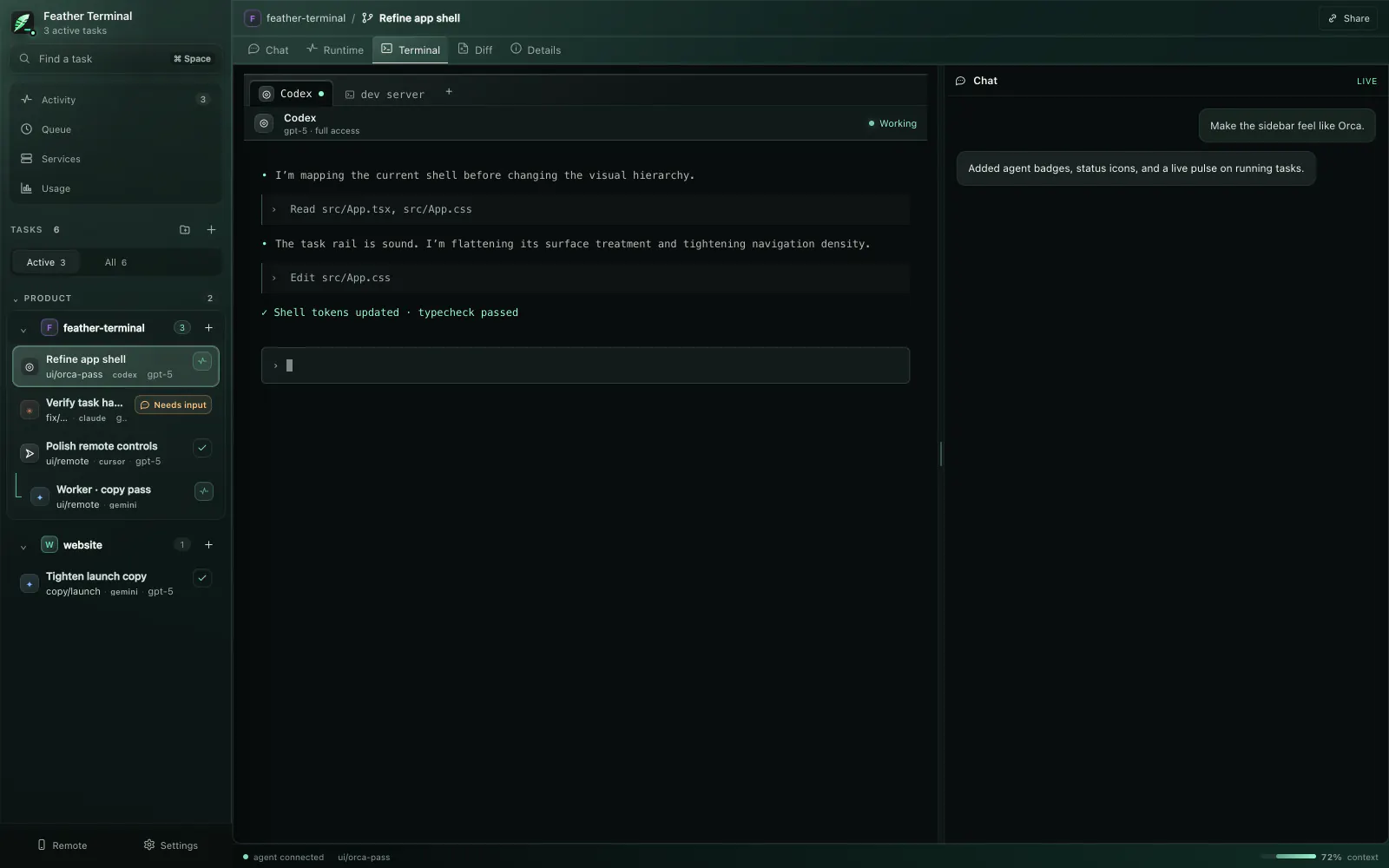 Feather Terminal
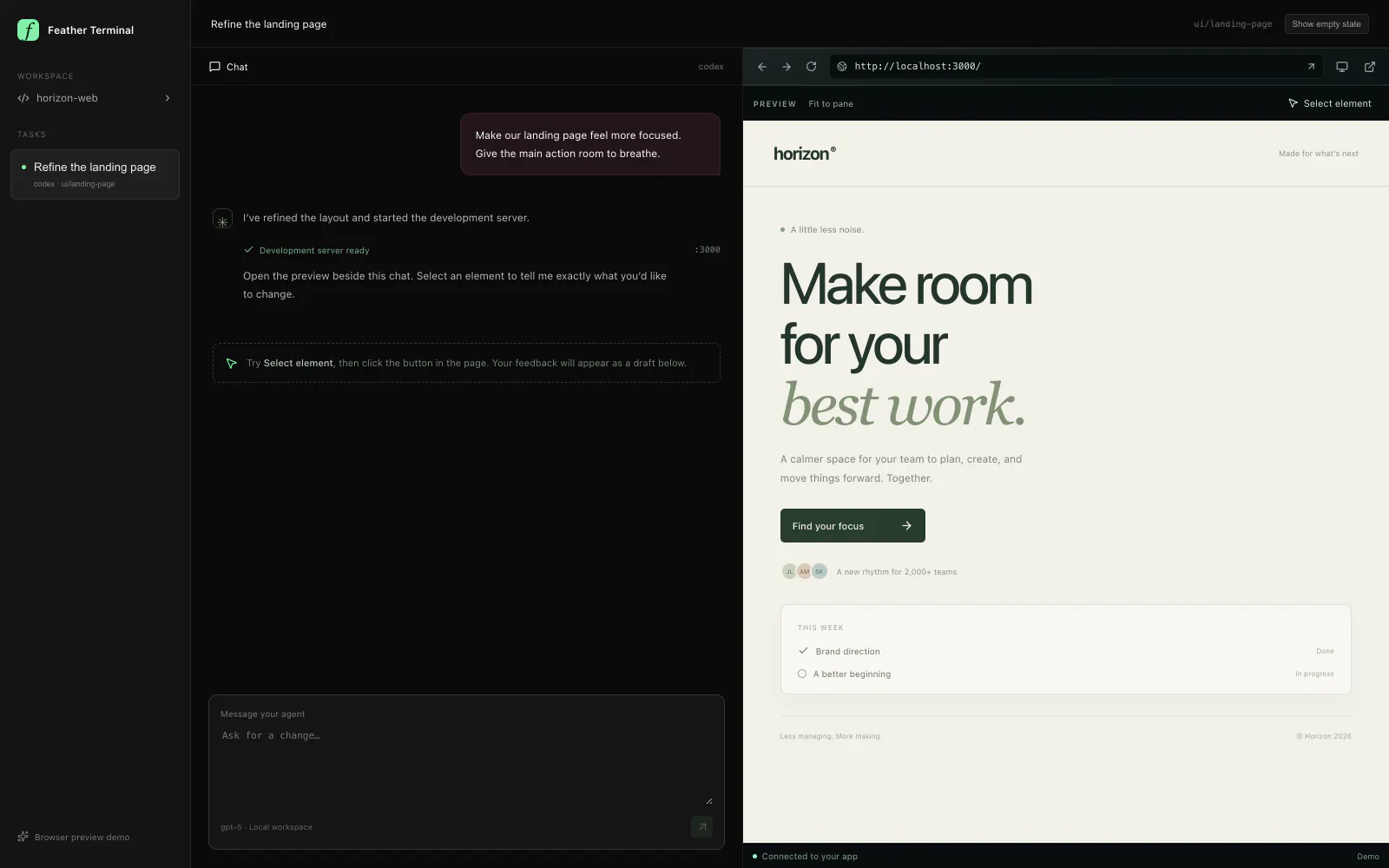 Feather Terminal
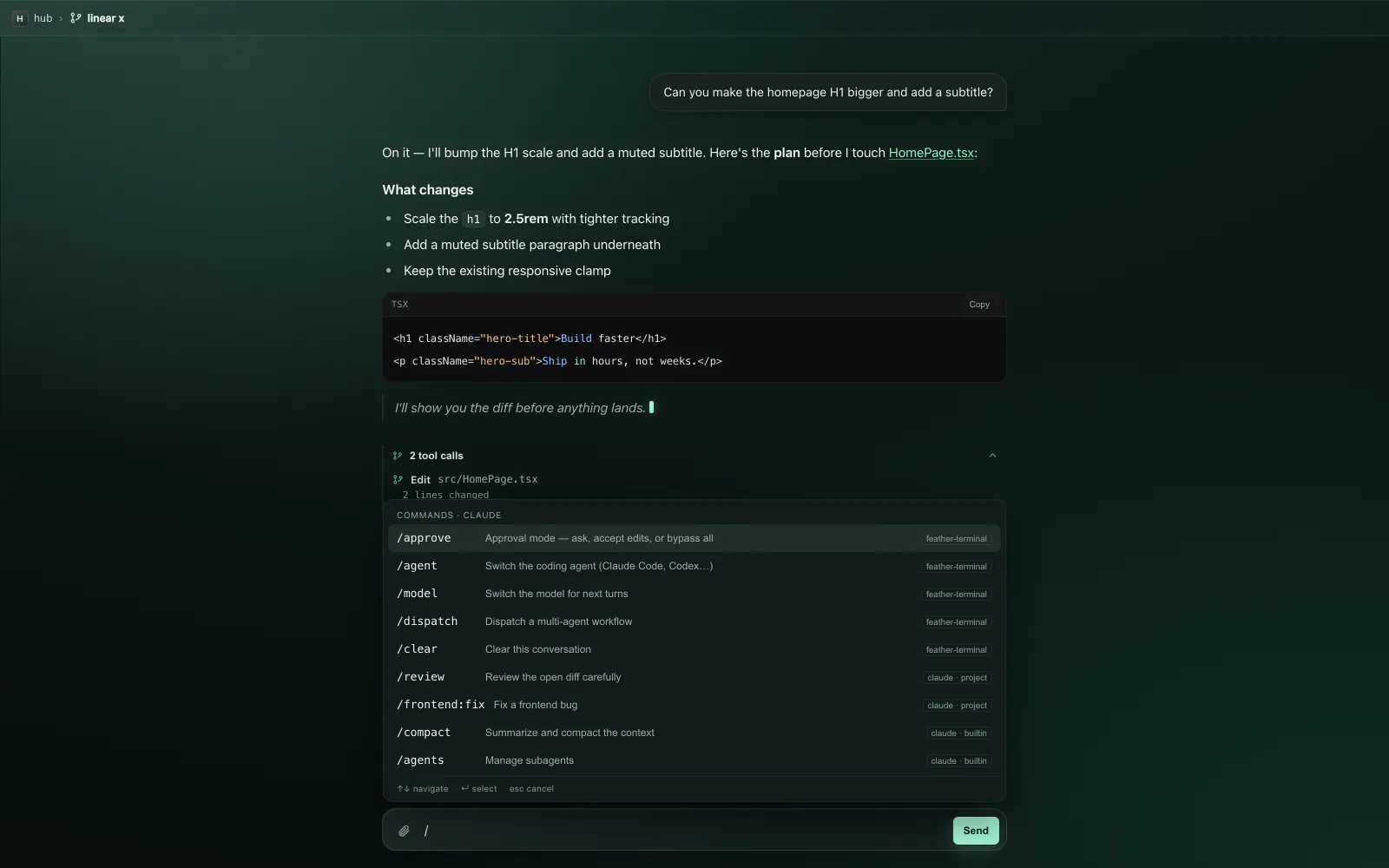 Feather Terminal
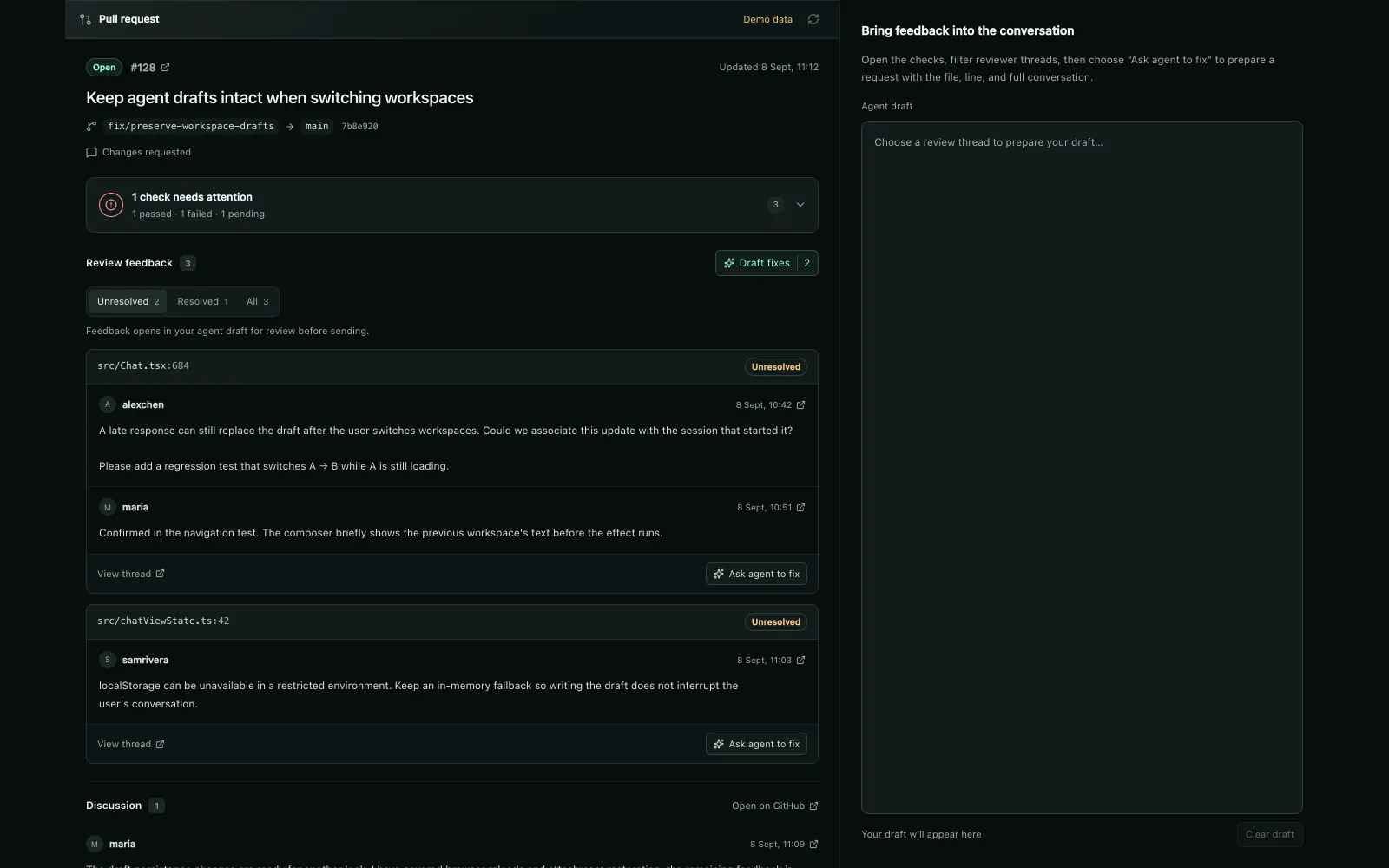 Feather Terminal
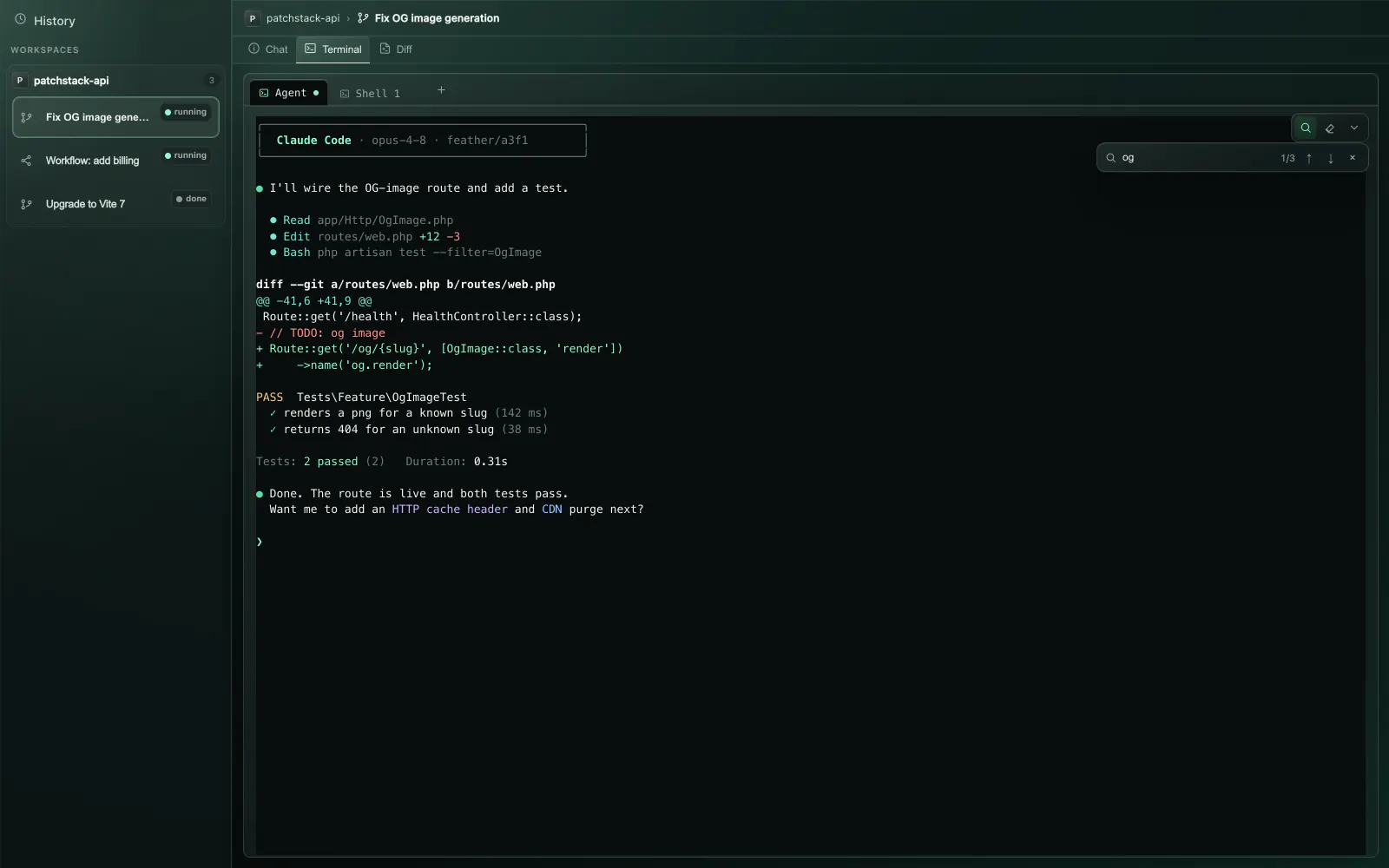 Feather Terminal
 Feather Terminal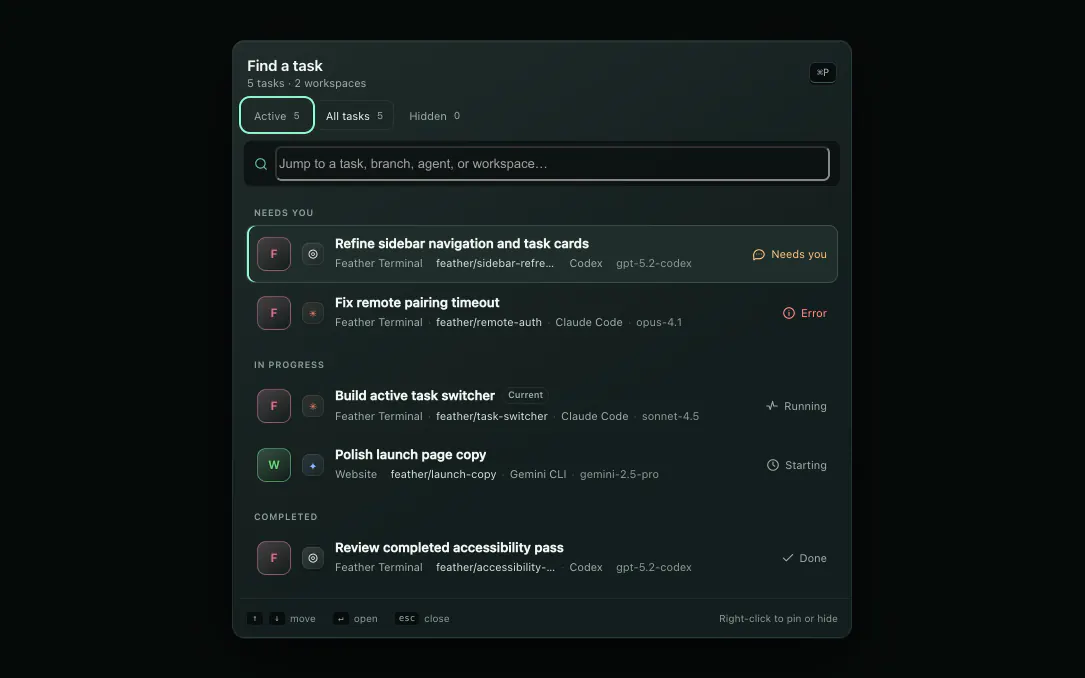
Drag a screen sideways to read the detail.
Captured from Feather Terminal on macOS. Workspaces, repositories, and review threads are examples, not real accounts.
New A closer connection to your work
The app you’re building. The feedback that makes it better. The space to think. Now closer to your agent, and closer to hand.
Open the app you’re building inside Feather. Point at a detail and turn your feedback into a draft with the right context attached.
Try it: choose Select element, then the shop button.
Thoughtful objects.
Made for the moments in between.
Draft prepared in this demo. Nothing has been sent.
See the pull request for your branch, its CI checks, and reviewer conversations. Bring unresolved feedback straight into an agent draft.
Uses your GitHub CLI sign-in. Try the thread filters and prepare a draft.
Ready to review. No message sent or GitHub thread changed.
Soft glass when you want depth. Solid surfaces when you want simplicity. Your chat, terminal, and code stay easy to read.
Try a material below. Your choice applies to this website and is saved in this browser.
Choose the surface that feels right.
Just landed Improvements in the latest preview
Queue a message while an agent works. It goes out when the turn finishes, even after you move to another task or Home. Errors and approvals pause it.
Changed files and the diff appear immediately. Saved reports, verification and GitHub status load alongside instead of holding them back.
Messages and the composer default to Fira Code. Choose Fira Code, JetBrains Mono or system fonts and a 12–18 px size in Settings, with a live preview.
An optional WebGPU assistant for quick questions when a provider quota runs out. Explicit model downloads, no account, prompts stay on your machine. Explore Local AI ↗
Local AI A second opinion, on device
Understand a task, untangle your setup, or shape the next step. Bring a local model into the places you already work, with useful context ready for the conversation.
Local AI On deviceWhy do these two tasks keep fighting over the same port?
Both dev commands use a fixed port. Give each task its allocated port so the servers can run side by side.
pnpm dev -- --port {{app_port}}For this Vite example, review the command in the workspace’s deployment settings.
Keep your next move in your hands.
Use a reply as a draft in your coding-agent chat.
Suggest setup and dev commands for this workspace.
Install the dependencies, then start Vite on the task’s allocated port. Here’s a draft to review.
{
  "setup": ["pnpm install"],
  "dev": ["pnpm dev -- --port {{app_port}}"]
}In Feather: add commands to the configuration draft, review, then Save.
Help me turn “fix login” into a clear task.
Start with the failure you can reproduce. A focused brief gives your coding agent a clearer target.
From a rough idea to a useful brief.
Use the reply as your draft before starting the coding task.
What needs clarifying in ENG-42?
The issue asks for better handling of expired sessions, but doesn’t say where the user should go next.
Should an expired session return to sign-in, or try to refresh first?
Source: ENG-42 · example issue
Connected context. Local answers.
Issue retrieval uses Linear’s network service; the reply is generated on your device.
Choose a model and download it explicitly. Local inference needs no provider account or API credits.
Bounded workspace context helps ground answers. Each task keeps its own local conversation and draft.
Turn useful replies into task briefs or setup drafts. Review and save command changes before using them.
Expanded integrations · next desktop build. Requires compatible WebGPU hardware. Local chats stay in memory while the app is open; small models can make mistakes.
Explore the desktop previewNEW / Queue & review
Choose what runs next. Keep the outcome of every attempt. Bring the changes, local verification, and GitHub feedback together when it is time to review.
The work, in order.
Move waiting tasks up or down, pause new dispatch, and retry a failed attempt in a fresh worktree. Add a prerequisite when one task needs to finish first.
Dependencies control start order. Code is reviewed and merged separately. Scheduled work requires Feather to be running.
Dispatch on · 1 place reserved for a worker
Try moving a task up. Its prerequisites still apply.
The Review tab brings the task brief, changed files, saved local test and agent-review reports, and GitHub feedback into one overview.
Local verification and GitHub CI show their own versions. Missing or skipped checks are never presented as passed.
Configured checks passed.
Recorded tree 3de91afNo blocking findings.
Recorded tree 3de91af2 reported checks passed.
PR commit 72bd810Current tree 3de91afLocal checks cover the current worktree. The PR still has feedback to address.
01 / Better together
Give one goal to a lead. Let the right agents take on independent work, each in its own worktree. Bring it all back to one result you can review.
The lead reads the goal and decides whether parallelism will actually help.
Up to four direct workers receive complementary, non-overlapping briefs.
Each worker runs with its own branch, worktree, model, and live status.
Edits are committed, ancestry checked, and failed merges are aborted cleanly.
Finished workers close themselves and free their worktree. You review one integrated diff.
Claude Code · checkout-reliability
feather/7f1a
Integratedfeather/8c2e
Integratedfeather/9d3b
IntegratedEnough parallelism without runaway fan-out.
Workers cannot create workers of their own.
The lead is restored when integration fails.
Done means the worker change is integrated.
An integrated worker releases its process, worktree, and ports. Its report stays with the lead, and a failed worker stays open for you to inspect.
02 / In your element
A workspace that keeps up with your ideas. Brief your agents, follow their progress, and review the details, all in one place.
Feather Terminal product tour
Product tour unavailableThe rest of the page shows every core workflow.
The workspace, in motion A guided recreation of the desktop experience.
Create a task with its goal attached. Choose your agent and environment, then follow the work from its first turn.
Build a task backlog, choose a concurrency limit, and set recurring schedules while Feather Terminal is running.
Choose the harness and model per task, or let Smart Models match the work to an available option.
export function validateAddress(values) {
- if (!values.country) return true;
+ if (!values.country) return invalid("country");
+ if (values.country === "CA") {
+ return validatePostalCode(values);
+ } return validateZip(values);
Review cleanFocused tests passed · no blocking findings
✓03 / Confidence, built in
One branch. One combined diff. A clear view of what changed, and the checks to help you move forward.
Review every integrated change with syntax-aware, file-by-file context.
Tests and a second-agent review can feed findings back into the task.
Save checkpoints and restore worktree files. When you’re ready, merge into the base branch or prepare a pull request.
04 / A little more freedom
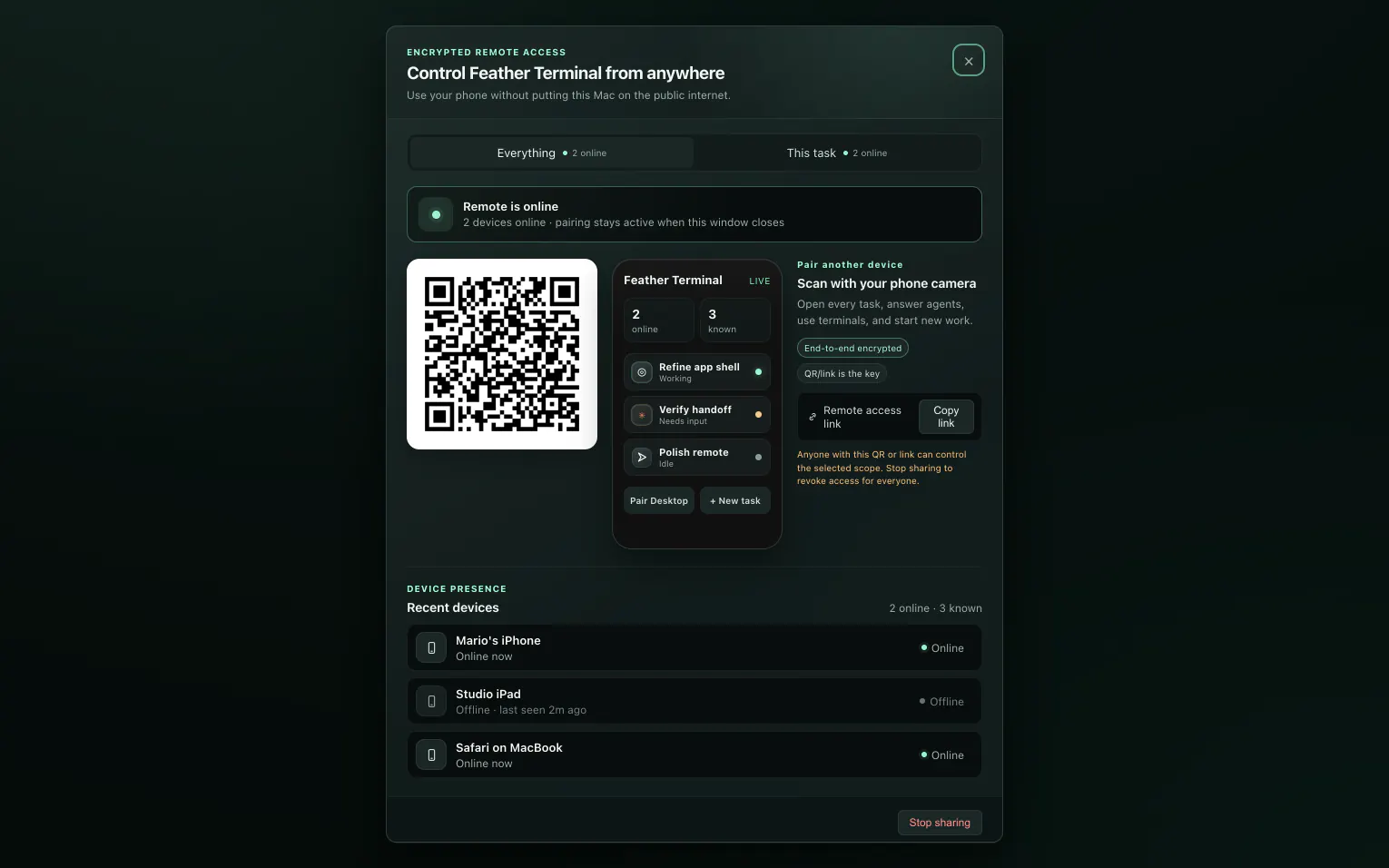
Pair the whole workspace or share one task with a server-enforced scope. Continue through the encrypted web companion when an agent needs a decision.
Choose full control or a task-scoped link before showing the QR.
Use chat, terminal, and diff for one task; add fleet, queue, and usage with full control.
The relay sees ciphertext. The QR is the key, and Stop Sharing revokes it for everyone.
The three worker branches are integrated. The configured checks pass.
Open the combined diff before merging?
05 / Thoughtfully equipped
The tools around your agents matter, too. Keep your environment, your time, and your next move under control.
Start tasks in isolated branches and working directories, or add another agent to an existing workspace.
FILES & COMMITSMove between structured chat and a real terminal. Search output and navigate command blocks in supported shells.
CHAT & TERMINALTrack ports, processes, app-wide services, and per-worktree SQLite isolation.
RUNTIME & SERVICESKeep a backlog, set concurrency and task budgets, and schedule recurring work while the desktop app is running.
AUTOMATIONCheck available account quotas, recorded tokens, and cost breakdowns. Token-priced estimates are identified separately from provider-reported costs.
MODELS & USAGEExpose core task, terminal, diff, review, queue, and agent operations on localhost.
AUTOMATABLE06 / The complete picture
The full capability index of the developer preview — grouped the way you actually work. Pick an area, or read straight through.
Showing all 9 areas.
Register a repository once. Every task after that gets its own branch, directory, ports, and data.
10 capabilities
Feather drives the CLIs you are signed in to. No new provider account, no proxy in the middle.
11 capabilities
A structured conversation when you want the summary, a real terminal when you want the truth.
12 capabilities
A lead splits the goal, workers run in parallel, and the code comes back through verified merges.
8 capabilities
Line up what comes next, control when it starts, and keep a ceiling on what it costs.
9 capabilities
Everything you need to decide whether a change is good — gathered in one place and honest about its gaps.
9 capabilities
Ports, processes, services, and a live preview — so you can see the result, not just the diff.
8 capabilities
Recorded token use and provider quotas, presented without pretending an estimate is a receipt.
5 capabilities
Everything the interface can do is available to your own automation — and none of it leaves the machine unasked.
12 capabilities
Desktop developer preview. Scheduled and queued work runs while Feather Terminal is open; background execution across restarts is still planned. Structured chat and collaboration depend on each harness's headless and tool-bridge support.
OPTIONAL FEATHER CLOUD
Keep using Feather without an account. Sign in with Google when you want cloud configurations and secure remote access. Cloud features are in preview. Desktop integration will arrive in an upcoming release.
No Feather account required. Projects, settings and .agent-config.json stay local.
Review configurations before uploading, back up personal settings and try remote access for seven days.
30 cloud workspaces, 10 environment snapshots per workspace, and up to 5 active invitations from one desktop. Cancel online; keep Pro until your paid period ends. Paid upgrades are opening soon.
Simple monthly pricing, with no per-minute remote charges. AI provider usage is billed separately. Existing cloud saves remain available after a downgrade.
Environment snapshots save configuration, runtime versions and lockfile fingerprints. They do not upload your repository, dependencies or environment values. Restore into a local checkout, review its commands, then rebuild.
At home on your machine
Feather Terminal runs on your computer. Your repository stays in local worktrees, with no upload to a Feather backend. Your coding agents use their own providers and data terms. Remote access is always optional.
A few things to know
Feather Terminal is currently a desktop developer preview. Here’s what to expect.
macOS · Windows · LinuxA free, local-first desktop app that runs AI coding agents such as Claude Code, Codex and Gemini CLI side by side, each task in its own Git worktree, with a live terminal, chat, app preview and an evidence-backed review before you merge.
The desktop developer preview is free and needs no Feather account. Your coding agents use their own provider logins and billing. An optional Feather Cloud account adds saved configurations and secure remote access; Pro is US$15 per month.
Feather Terminal includes Claude Code, Codex, Gemini CLI, OpenCode, Cursor CLI, GitHub Copilot CLI, and a plain shell. Structured chat and collaboration depend on each harness’s headless and tool-bridge support.
Workers start from a recorded commit in isolated worktrees. Feather Terminal commits their edits, verifies branch history, merges serially, confirms the worker commit landed, and aborts failed merges while restoring the lead. A worker that integrates then closes itself and releases its worktree and ports; its final report stays with the lead, and a failed worker stays open for you to inspect.
No Feather Terminal backend receives your repository. The app and worktrees run locally. The coding-agent CLI you choose may send prompt or code context to its own provider under that provider’s terms.
A task link exposes that task’s chat, terminal, diff, and permission replies. Full control adds workspace-wide task, queue, fleet, and usage surfaces. The desktop enforces the API scope, but a shared terminal still has your local user’s filesystem permissions.
Yes. A localhost MCP control plane exposes core workspace operations including tasks, terminals, diffs, reviews, queues, and bounded worker delegation.
Open your running app in the task’s Preview tab, select an element, and describe your change. Feather adds the element’s page, text, and layout context to a chat draft for you to edit and send. Desktop and mobile-width previews are available.
Yes. Sign in with the GitHub CLI to see the current branch’s pull request, CI checks, and review threads. Selected feedback becomes an editable agent draft. You decide when to send it; preparing a draft does not post or resolve GitHub comments.
Yes. Choose Glass or Solid in the desktop appearance settings, alongside accent color and display scale. The interface also respects supported system preferences for reduced motion, reduced transparency, and increased contrast.
Schedules run in the desktop app, so Feather must remain running on your computer. Queue items can have their own task budgets. When a schedule has a budget, each occurrence starts with a fresh budget.
Choose your platform in the download section. Links follow the latest published release automatically. macOS has separate Apple Silicon and Intel installers; Windows and Linux builds are experimental previews. Install Git and your coding-agent CLIs separately, then sign in with their own accounts.
Get Feather Terminal
Choose your platform. These links always follow the latest published desktop release.
Apple Silicon
M1 or newer
Installer not available yet.
Intel
Intel-based Macs
Installer not available yet.
64-bit
Windows 10 or newer · Preview
Installer not available yet.
64-bit
WebKitGTK 4.1 · Preview
Installer not available yet.
Developer preview. Windows and Linux builds are experimental. Install Git and your preferred coding-agent CLI before starting. Unsigned Windows builds and macOS builds without notarization may need approval from your operating system.
Developer preview
Bring your agents. Find your focus. Build what’s next.
Developer preview · macOS, Windows & Linux